
StudioDash App Store Analytics

Contents

Connect App Store Connect

Connect StudioDash to App Store Connect to bring important information about your apps into your StudioDash workspace. Instead of treating App Store data as a separate part of running your studio, it can be viewed alongside revenue, advertising and other connected services.

StudioDash uses the information available to your connected App Store Connect account and its API permissions, so the data shown may vary depending on the access available to that account.

Manage a Growing App Portfolio

Keeping track of one app is relatively simple. As your portfolio grows, understanding what is happening across every product becomes much harder. StudioDash provides a portfolio-level view so you can see your apps together rather than managing them as isolated products.

This makes it easier to spot apps that are gaining downloads, compare commercial performance and see which products may need your attention.

Follow Downloads and Sales

Track how your apps are performing over time using App Store data brought into StudioDash. Downloads and sales provide an important part of the picture when deciding where to spend development, marketing and advertising effort.

StudioDash combines these figures with information from other connected services, helping turn individual reports into a broader view of how your studio is performing.

Connect App Performance with Revenue

Downloads alone do not tell you whether an app is commercially successful. StudioDash helps connect App Store activity with revenue information so you can better understand which products are contributing to your studio.

Use the dedicated revenue analytics tools to explore revenue over time and compare income from the different sources connected to StudioDash.

Keep Track of Customer Feedback

Ratings and reviews are an important signal of how customers are responding to your apps. Bringing this information into the same workspace as your other app data makes it easier to keep customer feedback visible while monitoring the rest of your portfolio.

For developers managing several products, this provides a quicker way to identify apps that may need investigation or additional attention.

Monitor App and Release Status

StudioDash helps you keep track of where apps and releases are within the App Store process. This is particularly useful when several apps or updates are being prepared, submitted or reviewed at the same time.

Having release information alongside the rest of your portfolio reduces the need to repeatedly check individual apps simply to see whether their status has changed.

See More Than App Store Data

App Store Connect is only one part of understanding an app. StudioDash is designed to bring information from multiple services together so downloads, revenue, advertising, website performance and other available data can be viewed as parts of the same business.

As you connect more supported services, StudioDash gives you a broader picture of how your apps and your studio are performing.

Your App Portfolio in One Place

See how your apps are performing without checking each product individually in App Store Connect.

StudioDash brings your App Store portfolio together in one workspace. Review the apps you manage, check their current release status and follow important performance information without repeatedly moving between individual products and reports. It is particularly useful for independent developers and small studios managing several apps at the same time.

  • See your App Store portfolio from one dashboard.
  • Track downloads, sales and revenue across your apps.
  • Keep an eye on ratings, reviews and customer response.
  • Check release and App Store status without opening each app individually.
  • Compare performance across multiple products.
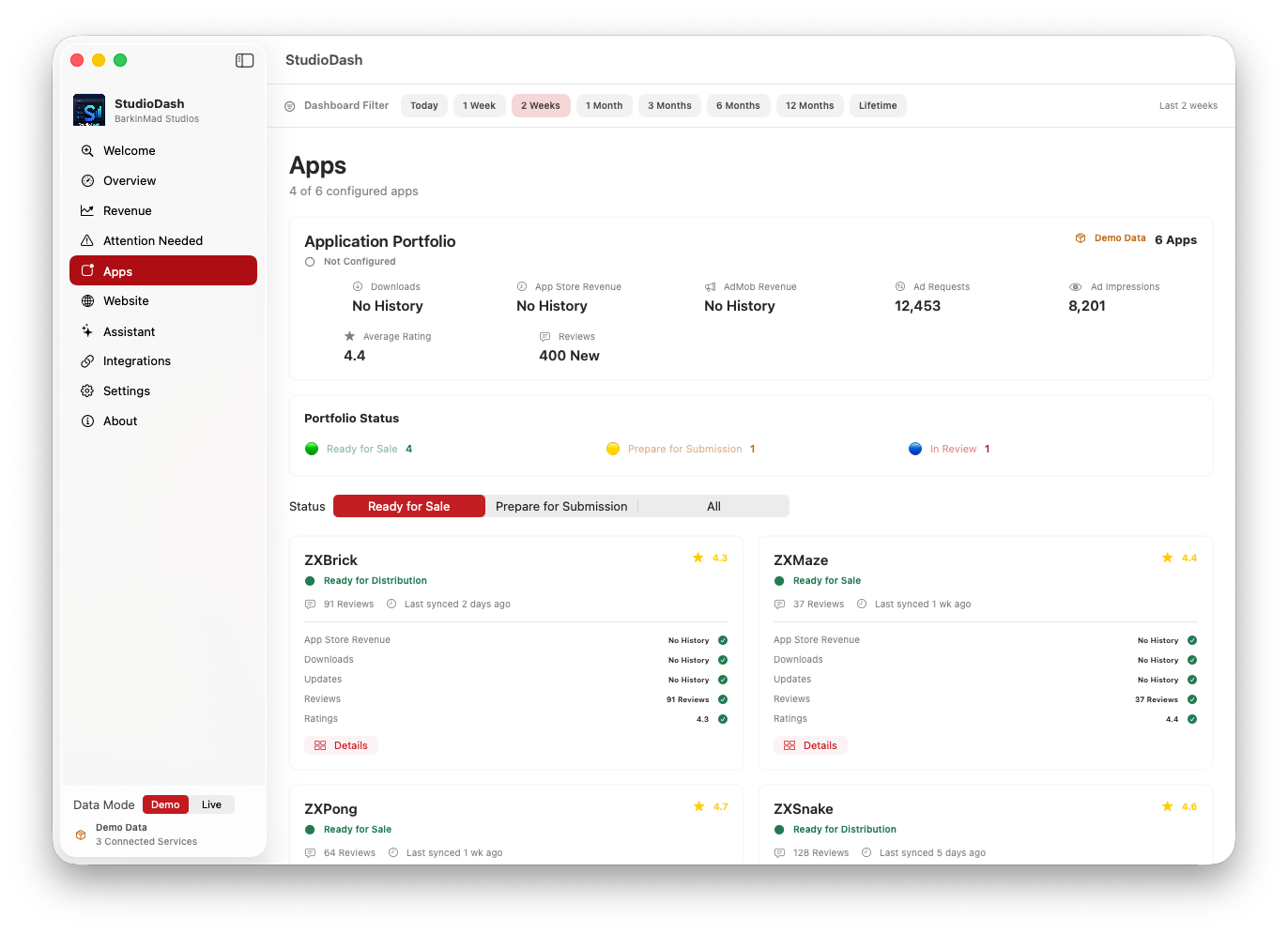
StudioDash App Store portfolio showing apps and their performance
Keep track of your apps and their performance from one workspace.