
StudioDash Website & SEO Analytics

Contents

Your Website Is Part of Your App Business

A developer website can do much more than provide a link to the App Store. Product pages, documentation, support content, news, developer articles, and other useful resources can all help people discover and understand your apps.

StudioDash keeps supported website information visible alongside the rest of your portfolio, helping you understand your online presence as part of the wider business rather than as an isolated website report.

Monitor Website Activity

StudioDash can use supported analytics and website services to provide a clearer view of activity across your sites and web content.

Rather than relying on raw request counts alone, different connected services can contribute their own perspective on website activity, audience behaviour, search discovery, and infrastructure.

  • Follow website activity over time.
  • Review supported audience and visitor information.
  • Monitor product, support, and content pages.
  • Compare website trends across different reporting periods.

Understand Your Audience with Google Analytics

Google Analytics can provide useful information about how people interact with your websites and digital content. StudioDash brings supported analytics information into the same workspace as your other studio data.

This provides an audience-focused view that complements search and infrastructure information, helping you understand actual visitor activity rather than relying on a single source.

Keep an Eye on Your Website Infrastructure

Cloudflare provides another perspective on your websites and the infrastructure serving them. StudioDash can bring supported Cloudflare information into your workspace alongside analytics and search performance.

Request and infrastructure information can include automated traffic as well as genuine visitors, so StudioDash treats it as a different signal from audience analytics rather than assuming every request represents a person.

Follow Your Google Search Visibility

Google Search Console shows how your website appears in Google Search. StudioDash can bring supported Search Console information into your reporting so you can follow how search visibility develops over time.

Clicks, impressions, click-through rate, and average position provide different ways of understanding whether your content is being discovered and whether search visibility is turning into visits.

  • Google Search clicks.
  • Search impressions.
  • Click-through rate.
  • Average search position.
  • Historical search performance.

See What People Are Searching For

Search query information can reveal the terms people use before finding your website. This can help you understand whether your product pages, guides, articles, and other content are appearing for the searches you intended to target.

Over time, query information can also reveal unexpected ways people discover your products and provide ideas for useful new content.

Discover Which Pages Attract Search Traffic

Page-level search reporting helps identify which parts of your website are earning visibility and visits from Google Search.

This can be especially useful when your site contains more than product pages. Documentation, support articles, news, developer content, and other useful resources can all contribute to the overall visibility of your studio.

Keep Track of Search Indexing

Publishing a page does not automatically mean it will immediately appear in search results. Search engines need to discover, crawl, and index content before it can become visible for relevant searches.

Supported Search Console information can help you understand the indexing state of your website and identify areas that may deserve further investigation.

Monitor the Foundations of Search Discovery

Sitemaps help search engines discover the pages available across your website. Keeping an eye on sitemap and indexing information can help identify whether important product, support, or content pages are being presented correctly for discovery.

StudioDash brings supported search information into the same reporting environment as your other website performance data.

Understand the Difference Between Traffic Signals

Different website services measure different things. Infrastructure request counts, analytics visitors, and Google Search clicks are related signals, but they should not be expected to produce identical numbers.

Automated crawlers, search engines, monitoring services, cached requests, privacy controls, and measurement methods can all affect the figures reported by different providers. StudioDash keeps these sources in context rather than treating them as interchangeable.

See Whether Your Content Is Working

A useful developer website can grow beyond a collection of product pages. Guides, documentation, support information, news, and developer content can all create additional opportunities for discovery.

Website and search reporting can help you see which areas are gaining visibility and where further useful content may strengthen the online presence of your apps and studio.

Connect Website Performance with Your Apps

Website activity becomes more useful when it can be viewed alongside what is happening elsewhere in your portfolio. A release, marketing campaign, new article, documentation update, or increase in search visibility may coincide with changes in other parts of your studio.

StudioDash keeps these areas within the same workspace, making it easier to investigate relationships without claiming that one metric automatically caused another.

Watch Visibility Grow Over Time

Search visibility and useful website traffic generally develop over time rather than changing overnight. Historical reporting helps you see whether impressions, clicks, traffic, and other supported signals are moving in the right direction.

Comparing longer periods can provide a more useful view of website progress than reacting to individual days.

Website Insights from Multiple Services

Google Analytics, Cloudflare, and Google Search Console each provide a different view of your online presence. Used together, they can provide more context than relying on any one service alone.

StudioDash brings supported information from these services into one workspace while preserving the meaning of the individual metrics.

Website Analytics for Different StudioDash Plans

StudioDash is designed around Free, Pro, and Studio plans. The level of website, search, historical, and detailed reporting available can vary by plan.

This allows developers to start with useful high-level information and access deeper analysis as their website, portfolio, and reporting needs grow.

See How People Discover Your Products

Bring website activity and Google Search performance into the same workspace as your apps and business.

Your website can play an important role in product discovery, support, documentation, and marketing. StudioDash brings supported website and search information together so you can follow traffic, search visibility, indexing, and longer-term trends without treating your website as a completely separate part of your studio.

  • Monitor supported website and visitor activity.
  • Follow Google Search clicks and impressions.
  • Review search queries and pages attracting visitors.
  • Track search visibility and average position.
  • Keep website performance alongside your apps and revenue.
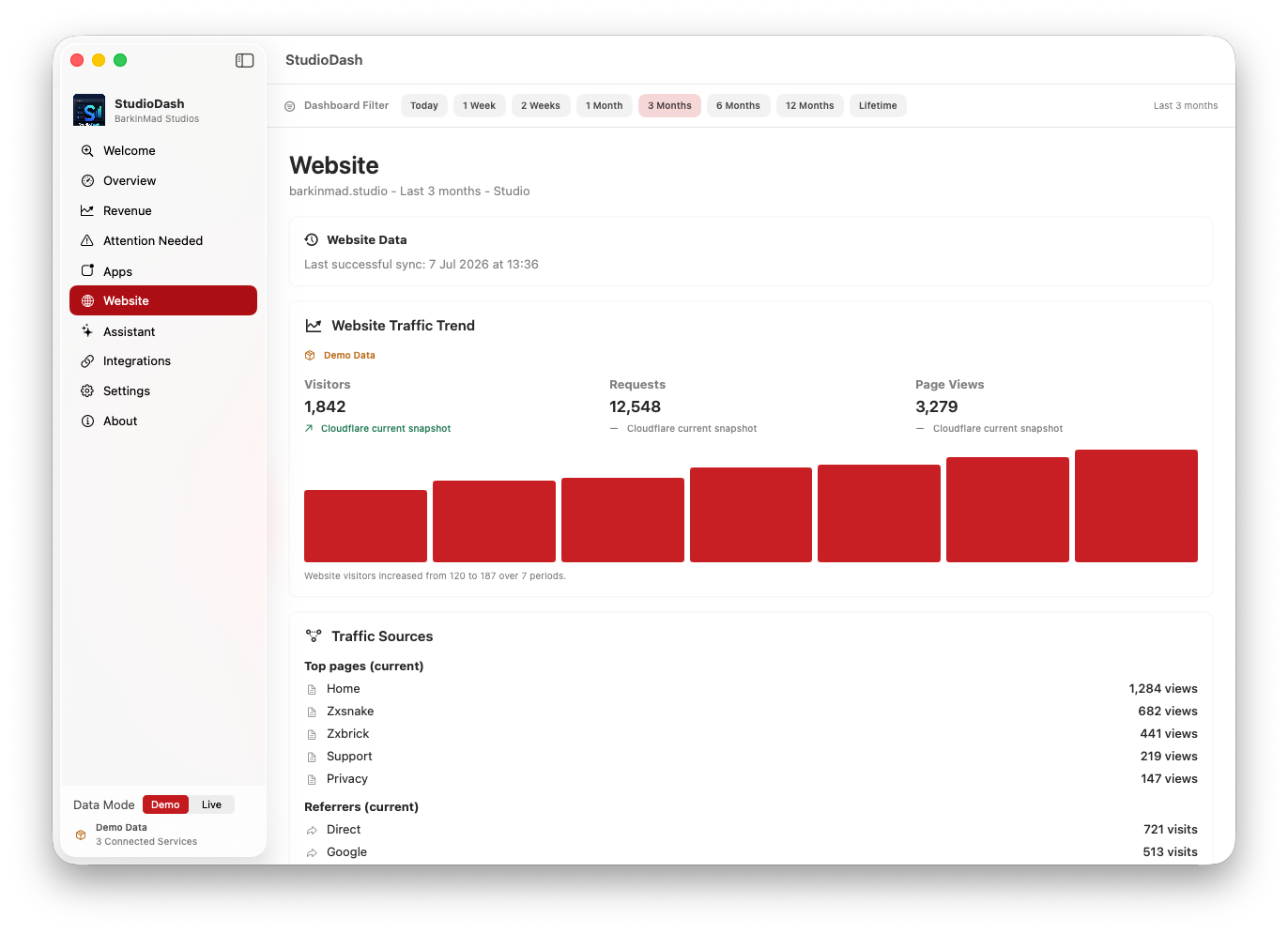
StudioDash website and Google Search analytics
Understand how your website contributes to the visibility of your apps and studio.